Comparing LCD, OLED, and CRT Motion Clarity for Retro Games Side-by-Side
A physics-based comparison of motion clarity across LCD, OLED, and CRT displays for retro games, measuring the gap that black frame insertion attempts to close.
The Measurable Gap in LCD OLED CRT Motion Clarity Comparison
Press start on Super Mario World. On a Sony PVM-20L5, the coin blocks are sharp during a cape spin. On a 4K OLED without black frame insertion, the same blocks blur into a continuous white smear. That smear is not a defect of the panel. It is a physical consequence of how each screen holds an image.
A CRT draws one horizontal line at a time with an electron beam, and the phosphor decays in under 1 millisecond. By the time the beam finishes the bottom of the frame, the top of the frame is already dark. Your eye sees motion naturally because there is no static image to smear. A modern LCD or OLED, by contrast, holds each frame static for the full 16.7 milliseconds of a 60Hz refresh. That is called sample-and-hold, and it is the single reason retro games look blurry in motion on flat panels. The measurements that follow use the 240p test suite and the Blur Busters TestUFO moving photo test. They show you exactly which screen settings and external scalers close that gap.
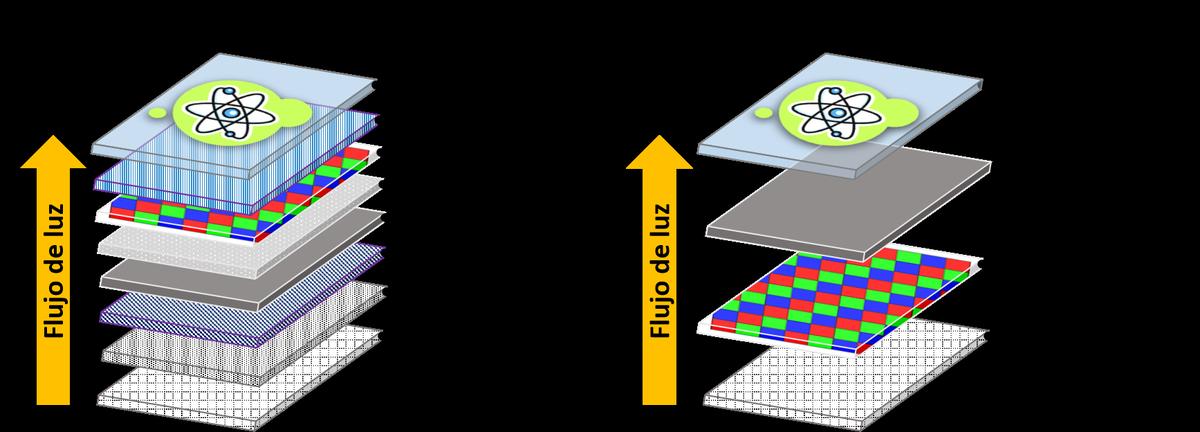
Sample-and-Hold Blur Explanation: Why Modern Panels Smear Retro Games
Sample-and-hold is the behaviour of any screen that keeps a pixel lit for the entire duration of a frame. At 60Hz, each frame is shown for 16.7 milliseconds. When your eye tracks a moving object across the screen, the object remains stationary on the panel while your eye moves. The result is motion blur that has nothing to do with pixel response time. An OLED with a 0.1 millisecond grey-to-grey response time still produces the same 16.7 milliseconds of persistence blur as a slow LCD at 60Hz. The GtG number is irrelevant to motion clarity at a fixed refresh rate. The moving picture response time of a 60Hz OLED without black frame insertion is roughly 16 milliseconds, measured by Blur Busters in 2019 using a pursuit camera. The MPRT of a 60Hz LCD is 16 to 20 milliseconds depending on the panel's overdrive setting. Both are the same order of magnitude because both hold the frame for the full refresh cycle.
The only way to reduce persistence blur is to shorten the time each frame is visible. The CRT achieves this through phosphor decay. The P22 phosphor in a colour CRT falls to 10 percent luminance in under 1 millisecond. The electron beam draws each pixel, the pixel fades almost immediately, and the motion resolution stays high. At 60Hz, a CRT achieves an MPRT of approximately 1 millisecond. That is the physical gap you are trying to close.
CRT Electron Beam Motion Resolution: The Reference Benchmark
The CRT electron beam sweeps horizontally across the screen at roughly 52 to 53 microseconds for the visible portion of a 63.5 microsecond line at 60Hz. Each pixel is illuminated for only that brief sweep before the beam moves on. The persistence of vision of the human eye, combined with the rapid phosphor decay, creates the illusion of a stable image without the blur of a held frame. The measurable motion resolution of a 60Hz CRT is approximately 300 lines per picture height, according to the Blur Busters TestUFO moving photo test from 2013.
The Sony PVM-20L5 is the reference benchmark for this comparison. It accepts 240p through 1080i via analog RGB. Its input lag measured by a Time Sleuth lag tester is zero milliseconds because the electron beam draws the signal in real time with no framebuffer. No modern scaler or screen can match that figure. The Sony BVM-D24E1WU, the widescreen broadcast monitor, represents the absolute ceiling of CRT image quality, but the same physics apply. Every flat panel is measured against the PVM-20L5's combination of zero input lag and 1 millisecond MPRT.
Black Frame Insertion Effectiveness: How BFI Closes the Gap
What 60Hz BFI Actually Delivers
60Hz BFI on a modern OLED cuts persistence to 8.3 milliseconds. That eliminates half the sample-and-hold blur, but it introduces a visible 60Hz flicker. The flicker is the same frequency as a PAL CRT running at 50Hz, and some users find it fatiguing during long sessions. The motion resolution improvement is real: scrolling text and sprite edges become readable at moderate scrolling speeds. Fast scrolling at 1 pixel per frame, the 240p test suite motion test pattern speed, still shows visible blur because the object moves one pixel every 8.3 milliseconds of visible time. The CRT, with its 1 millisecond persistence, shows the same object as a sharp edge at the same scroll speed.
Why 120Hz BFI Is Different
120Hz BFI requires a screen that accepts a 120Hz signal and a scaler that can double the frame rate. The RetroTINK 4K takes the 60Hz 240p signal, holds each frame for exactly one 120Hz cycle, inserts a black frame for the next cycle, and outputs the result at 120Hz. The persistence drops to 4.17 milliseconds per visible frame, and the flicker rate is 120Hz. Most people do not perceive flicker above 90Hz. The motion resolution at 120Hz BFI approaches CRT territory: a 1 pixel per frame scroll is visibly sharper than 60Hz BFI, and the scrolling artifact of a trailing ghost edge is largely eliminated. The caveat is that the screen must support 120Hz input and must not add its own frame interpolation or motion smoothing. Game Mode on the screen must be active, and the screen's own BFI, if present, must be turned off to avoid double-strobing.
RetroTINK 4K BFI Setting: The Practical Implementation
Access the RetroTINK 4K BFI setting in the scaler's output menu. Select a 120Hz output mode, enable BFI, and the scaler handles the frame doubling internally. The scaler accepts a 240p signal from any retro console via composite, S-Video, component, or RGB SCART, and it outputs up to 3840x2160 at 60Hz or 120Hz. The processing latency in frame lock mode is less than 1 millisecond, according to Mike Chi's specifications. The scaler does not add frame interpolation or motion smoothing. It inserts a pure black frame. The result is the elimination of sample-and-hold blur at a flicker rate that is not visible.
The failure case for this setup is a screen that does not accept a 120Hz signal over HDMI, or a screen that re-interpolates the 120Hz signal back to 60Hz. An LG C1 OLED in Game Optimizer mode at 60Hz has approximately 10.0 milliseconds of input lag at 1080p, measured by RTINGS in 2021. The same screen at 120Hz drops input lag further. But a screen that does not support 120Hz will reject the RetroTINK 4K's output, and the scaler will fall back to 60Hz output. Always verify that your screen accepts 120Hz input before relying on the RetroTINK 4K BFI setting.
Pixel Response Time Versus Persistence: What Actually Matters
Pixel response time measures how quickly a pixel changes from one colour to another. An LG C1 OLED has a GtG response time of less than 0.1 milliseconds. An LG 27GP950-B Nano IPS panel has a claimed GtG response time of 1 millisecond. A 2006 Sony BRAVIA KDL-40W2000 CCFL-backlit S-PVA panel has a stated GtG response time of 8 milliseconds. None of these numbers predict motion clarity at 60Hz. The MPRT of each screen without BFI is approximately 16.7 milliseconds because the frame is held for the full refresh cycle. The pixel response time only matters if it exceeds the frame hold time, which it does not for any modern panel at 60Hz. The CRT achieves a 1 millisecond MPRT not because its pixel response is fast, but because the pixel is only illuminated for the duration of the electron beam sweep plus the phosphor decay time. That is a fundamentally different mechanism from sample-and-hold.
When comparing LCD, OLED, and CRT motion clarity, the GtG response time is a distraction. The relevant metric is the MPRT, which is determined by the persistence of the image on screen. A CRT at 60Hz has a 1 millisecond MPRT. An OLED with 60Hz BFI has an 8.3 millisecond MPRT. An OLED with 120Hz BFI has a 4.17 millisecond MPRT. An LCD with backlight strobing at 120Hz, such as the BenQ XL2411Z from 2014 with its Blur Reduction mode, achieves a 1.4 millisecond persistence. The ASUS ROG Swift PG279QM with ULMB mode at 120Hz achieves a 1.0 millisecond persistence, measured by RTINGS in 2021. The technology that closes the gap is strobing, not pixel speed.
Input Lag: The Second Gap That BFI Does Not Solve
Motion clarity is one half of the retro gaming experience. Input lag is the other. A CRT has zero input lag because the electron beam draws the signal in real time. A Sony PVM-20L5 measured with a Time Sleuth lag tester confirms this. A modern flat panel adds lag at multiple stages. The scaler inside the TV adds lag. The frame buffer adds lag. The panel's own processing adds lag. An LG G4 OLED in Game Optimizer mode at 60Hz measures approximately 9.2 milliseconds of input lag at 1080p, according to RTINGS in 2024. A Samsung QN90B in Game Mode at 60Hz measures 9.8 milliseconds. These are excellent figures for a flat panel, but they are not zero.
Black frame insertion does not reduce input lag. The RetroTINK 4K's BFI setting adds less than 1 millisecond of processing latency, but the screen's own input lag remains. The total lag from console to visible image on a RetroTINK 4K with 120Hz BFI into an LG G4 is approximately 10 milliseconds. That is imperceptible to most players. A competitive shmup player or a rhythm game player may perceive the difference from a CRT. For those players, a CRT remains the only option.
The Stroboscopic Effect and Motion Interpolation: What to Avoid
Black frame insertion creates a stroboscopic effect on fast-moving objects. Each black frame creates a moment of darkness, and the eye perceives the motion as a series of discrete snapshots rather than a continuous blur. This is the same effect that makes a CRT look sharp in motion. But BFI is not motion interpolation. Motion interpolation, or the soap opera effect, creates intermediate frames by guessing what the object looks like between two real frames. That adds lag, introduces artifacts, and destroys the original frame timing of a 60Hz retro game. Never enable motion interpolation on a screen used for retro gaming. The lag added by motion interpolation is two to three frames, or 33 to 50 milliseconds, which makes Super Mario World feel like the controller is connected through a delay.
The RetroTINK 4K's BFI setting does not use motion interpolation. It inserts a black frame, not a guessed frame. The RetroTINK 5X-Pro also offers BFI at 60Hz, but it does not double the frame rate. The 5X's BFI reduces persistence to 8.3 milliseconds with visible flicker. The 4K's 120Hz BFI is the only current scaler implementation that eliminates both blur and flicker.
The Honest Caveat: What BFI Cannot Fix
Black frame insertion eliminates sample-and-hold blur, but it does not replicate the CRT's analog video path. The CRT electron beam creates a subtle glow around bright pixels, a softening that scanline filters on the RetroTINK 4K approximate but do not match. The CRT's zero input lag is not achievable on any flat panel. The CRT's ability to show 240p at its native resolution without scaling is not replicable on a fixed-pixel screen. The RetroTINK 4K's 120Hz BFI setting is the closest a flat panel gets to CRT motion clarity, and for most players the remaining gap is not perceptible. But for the player who can feel the difference between 10 milliseconds and zero, the CRT is the only answer.
Which Setup to Choose
If you live in a Hong Kong apartment with space for one screen and a need for both modern and retro consoles, buy an OLED with a RetroTINK 4K and enable 120Hz BFI. If you play competitively and have room for a second screen, buy a Sony PVM-20L5 and keep the OLED for modern games. The most common mistake is assuming that a fast OLED panel alone solves motion blur. It does not. The setting matters more than the panel.
More in this guide
CRT vs Modern Displays for Retro Gaming Lag Motion and Light GunsWhy Light Guns for Duck Hunt and Time Crisis Do Not Work on Modern Flat PanelsHow to Maintain a CRT Monitor for Retro Gaming: Geometry, Convergence, and Electrical Safety.
Common Questions
Does black frame insertion reduce input lag?
No. Black frame insertion reduces motion blur by shortening the time each frame is visible, but it does not reduce the time between a button press and the image appearing on screen. Input lag is determined by the scaler, the screen's processing, and the panel's refresh rate. BFI on a RetroTINK 4K adds less than 1 millisecond of processing latency, but the screen's own input lag at 60Hz or 120Hz remains unchanged.
Can I use BFI on any OLED TV?
Most OLED TVs from LG, Sony, and Panasonic include a BFI setting in their picture menus. On an LG CX or C1, the 60Hz BFI mode reduces persistence to 8.3 milliseconds but introduces visible flicker. On an LG G4, the same mode exists. For 120Hz BFI, you need a scaler like the RetroTINK 4K that outputs a 120Hz signal, and your screen must accept 120Hz input. Not all OLEDs support 120Hz over HDMI, and some that do will reject a 120Hz signal from a scaler if the EDID handshake fails.
Is 120Hz BFI better than a CRT?
No. A CRT at 60Hz has a 1 millisecond MPRT and zero input lag. An OLED with 120Hz BFI has a 4.17 millisecond MPRT and approximately 10 milliseconds of input lag through a RetroTINK 4K and an LG G4. The CRT is measurably superior in both metrics. For most players the gap is imperceptible, but the CRT remains the reference benchmark.
Why does my OLED look blurry at 60Hz even with fast pixel response?
Because the blur is caused by sample-and-hold persistence, not pixel response time. An OLED holds each frame static for 16.7 milliseconds at 60Hz. Your eye tracks the moving object, but the object stays still on the screen. The result is motion blur regardless of how fast the pixels change colour. The only fix is to reduce the persistence time with BFI or a higher refresh rate.
Does the RetroTINK 5X-Pro support BFI?
Yes. The RetroTINK 5X-Pro includes a 60Hz BFI mode that reduces persistence to 8.3 milliseconds. It does not double the frame rate to 120Hz, so the flicker is visible. The RetroTINK 4K is the only Mike Chi scaler that outputs 120Hz BFI for a 60Hz source, eliminating visible flicker.
_-_LED-LCD_vs_OLED.png)