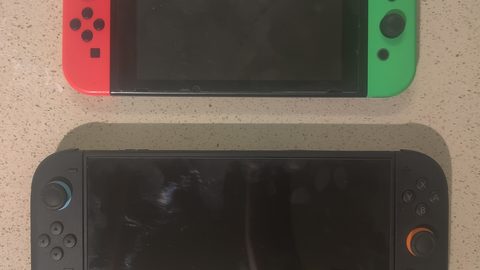
Nintendo Switch Handheld vs Docked Image Quality: Resolution and Performance Compared
Understand how Nintendo Switch image quality changes from handheld 720p to docked 1080p, why dynamic resolution scaling affects both modes, and what an external scaler can and cannot improve.
The Moment You Notice The Difference
You start The Legend of Zelda: Breath of the Wild on your Nintendo Switch OLED, pull it from the dock, and the world keeps running. On a 55-inch 4K TV, the grass shimmered with anti-aliasing that smoothed every blade. In your hands, seven inches away, that same grass looks softer. The mountain edges lose definition. But the screen feels dense. The difference is not that one is better and the other worse. The Nintendo Switch handheld vs docked image quality question is about two completely different display physics. Understanding each one keeps you from spending money on the wrong fix.
Handheld Mode: 720p On A Small Screen
How The Handheld Screen Renders Each Frame
In handheld mode, the Nintendo Switch renders at a native resolution target of 1280 x 720 pixels on a 6.2-inch LCD screen (original and 2019 revision), a 7.0-inch OLED screen (HEG-001 model), or a 5.5-inch LCD screen (Lite, HDH-001). The GPU clock speed drops to 307.2 MHz, less than half the docked 768 MHz. Memory bandwidth stays at 25.6 GB per second in both modes. The bottleneck is the GPU, not the memory bus.
What you see on the handheld screen is not a downscaled 1080p image. The Tegra X1 SoC renders the frame at whatever resolution the developer set for portable mode, then the console's system-level bilinear filter stretches it to fill the 720p display. Many games use a shifting render resolution that drops below 720p during heavy scenes. Digital Foundry's analysis of The Legend of Zelda: Tears of the Kingdom recorded handheld resolutions dropping during combat, but in practice the OLED screen's pixel density of roughly 210 pixels per inch (the original LCD is about 237 ppi) makes sub-720p renders look sharper than they would on any TV. A low-resolution frame on a 7-inch screen has a pixel pitch so fine that individual pixels are invisible at normal viewing distance.
Battery Life And Thermal Limits
The failure case in handheld mode is not resolution. It is battery life. The original HAC-001 model lasts 2.5 to 6.5 hours depending on the game. The OLED model and the 2019 revision manage 4.5 to 9 hours. The Lite runs 3 to 7 hours. Play a GPU-intensive title like Doom Eternal at maximum brightness and you get the low end of that range. Thermal throttling is rare in handheld mode because the GPU runs cool enough that the fan in the OLED model barely spins. The Lite, lacking a fan entirely, can throttle in hot environments.
Docked Mode: 1080p Target, Shifting Reality
What Happens When The Console Hits The Dock
Slot the Switch into the dock and the GPU clock jumps to 768 MHz. The HDMI output targets 1920 x 1080 pixels at 60 Hz over HDMI 1.4. The system UI renders at full 1080p. Games do not. The dock chipset handles the HDMI handshake and EDID negotiation with your TV, but it does no scaling itself. The Tegra X1 renders the game at whatever resolution the developer chose for docked mode, then the console's bilinear filter upscales that frame to 1080p before sending it over HDMI.
The common docked rendering range is 1080p down to 720p, and sometimes lower. Digital Foundry's frame-rate and resolution analysis of Xenoblade Chronicles 3 recorded docked resolutions dropping to 540p in busy areas. On a 55-inch 4K TV, that means the TV's own scaler stretches a 540p frame to fill 3840 x 2160 pixels. That non-integer scaling creates visible softness. The Switch outputs a 4:4:4 chroma signal in RGB limited (16-235) or full (0-255) colour space, selectable in the system settings. The TV then adds its own processing lag. Even with Game Mode enabled, a typical Hong Kong Samsung or LG TV adds 10-15ms at 1080p and 30-40ms at 4K.
The Real Problem Is The TV, Not The Console
The docked image quality problem is not the Switch. The problem is the mismatch between the console's rendering resolution and the TV's native resolution. A 720p docked render on a 1080p TV is a 1.5x non-integer scale. On a 4K TV it is a 2.25x scale, and the TV's scaler handles it differently per brand. Some TVs add sharpening halos. Others soften the image to hide the upscale. You cannot control this from the Switch itself.
| Model | Handheld Screen | Handheld Resolution | Docked Target | GPU Clock (Handheld/Docked) | Battery Life (Hours) |
|---|---|---|---|---|---|
| Original HAC-001 | 6.2 in LCD | 1280 x 720 | 1920 x 1080 | 307.2 MHz / 768 MHz | 2.5 - 6.5 |
| 2019 Revision HAC-001(-01) | 6.2 in LCD | 1280 x 720 | 1920 x 1080 | 307.2 MHz / 768 MHz | 4.5 - 9 |
| OLED HEG-001 | 7.0 in OLED | 1280 x 720 | 1920 x 1080 | 307.2 MHz / 768 MHz | 4.5 - 9 |
| Lite HDH-001 | 5.5 in LCD | 1280 x 720 | N/A (no dock) | 307.2 MHz / N/A | 3 - 7 |
Switch Handheld 720p Vs Docked 1080p: The Real Resolution Gap
The headline numbers are 720p handheld and 1080p docked. The real gap is wider. A game that renders at 720p in docked mode has already lost half the pixel count of the 1080p target. In handheld mode, that same game rendering at 720p fills the screen exactly. The docked mode's 720p render gets upscaled to 1080p by the Switch, then upscaled again to 4K by the TV. Each step introduces softness.
The OLED handheld screen uses an S-Stripe RGB subpixel layout, which is Pentile-like and has a lower effective resolution per colour channel than a standard RGB stripe LCD. The original and 2019 revision LCDs use a standard RGB stripe. The Lite uses RGB stripe at a higher pixel density of 267 ppi. The OLED's 210 ppi is lower than the original LCD's 237 ppi, but the OLED's contrast and colour saturation make the image look subjectively sharper. A sub-720p render on the OLED screen looks better than the same render on a 1080p LCD TV because the TV reveals every artifact at full size.
How Shifting Resolution Works In Portable Mode
Shifting resolution is the Switch's most important image quality feature and the reason you cannot trust the box resolution. The Tegra X1 can adjust the render resolution on a per-frame basis, dropping pixels when the GPU is under load and raising them when the scene is simple. In portable mode, the lower GPU clock means the shifts happen more often and drop lower.
Digital Foundry's analysis of Metroid Dread showed the game maintaining a near-locked 720p in handheld mode because the art style is simple. The Witcher 3: Wild Hunt, by contrast, drops to 540p in handheld mode during forest traversal. The system's bilinear filter masks the low resolution on the small screen, but the loss of fine detail is measurable. On the OLED model, the lower pixel density of 210 ppi compared to the original's 237 ppi means the softness is slightly more visible. The OLED's perfect black levels in dark scenes compensate.
Switch OLED Handheld Screen Vs TV Docked: Which Display Wins
The OLED model's 7.0-inch screen peaks at roughly 350 cd/m² brightness, about 50 cd/m² higher than the original LCD. The OLED's infinite contrast ratio makes highlights in Zelda: Breath of the Wild look punchy on the handheld. On a TV, the same game outputs a standard dynamic range signal over HDMI 1.4. The TV's local dimming or HDR processing cannot improve the Switch's output. The Switch does not output HDR.
For competitive games like Splatoon 3, the handheld OLED screen has lower input lag than a TV because there is no display processing. The screen's pixel response time is faster than most LCD TVs. The trade-off is the 60 Hz refresh rate limit. A high-refresh gaming monitor connected via the dock still receives a 60 Hz signal from the Switch. The monitor's extra headroom offers no advantage.
External Upscaler For Docked Switch: What It Can And Cannot Fix
How The Dongle Processes The Signal
The Marseille mClassic is a plug-and-play HDMI dongle that applies context-adaptive anti-aliasing and upscaling to the Switch's 1080p output. It accepts up to 1080p input and outputs up to 1440p at 60 Hz, or 4K at 30 Hz and below. The device is powered by a USB micro-B cable at 5 volts, and it adds roughly 1-2ms of processing latency, measured by independent testers using a Time Sleuth. Marseille's marketing implies zero lag, but the context-adaptive algorithm requires a small analysis window.
The dongle can smooth jagged edges on a game that renders at 1080p in docked mode, like Super Mario Odyssey. It cannot recover detail that the Switch never rendered. If a game runs at 720p in docked mode, the device receives a 720p frame upscaled to 1080p by the Switch, and then applies its anti-aliasing to that already-upscaled image. The result is a softer image with fewer jaggies but no additional resolution. The 1440p output is a 1440p frame containing a 1080p active image area upscaled, not a native 1440p render.
Where The Dongle Falls Short
The failure case is a game with heavy shifting resolution. Xenoblade Chronicles 3 in docked mode drops below 720p, and the dongle's processing cannot fill in the missing pixel data. The retro mode, enabled by a physical switch on the device, adds a scanline effect that works well for pixel-art games but looks artificial on modern 3D titles. This accessory is not a substitute for a higher render resolution. It is a post-process filter that works best on games that already hit 1080p in docked mode.
Switch Game Resolution Handheld Mode List: What The Research Shows
Digital Foundry and official patch notes provide the most reliable resolution data for Switch games. Use this list to check your library before buying any external scaler:
- The Legend of Zelda: Breath of the Wild, Handheld: 720p (shifts in some scenes). Docked: shifts, targets 1080p.
- The Legend of Zelda: Tears of the Kingdom, Handheld: 720p, shifts in sky areas. Docked: shifts, drops to 720p in busy areas.
- Super Mario Odyssey, Handheld: 720p (near-locked). Docked: 1080p (locked). One of the few games that holds full resolution in both modes.
- Metroid Dread, Handheld: 720p (locked). Docked: 1080p (locked). The simple 2.5D art style allows a clean render.
- Xenoblade Chronicles 3, Handheld: 540p, shifts. Docked: 540p to 720p, shifts. The most resolution-challenged major title.
- The Witcher 3: Wild Hunt, Handheld: 540p, shifts. Docked: 720p, shifts. The 2022 patch improved docked stability but did not raise the render ceiling.
- Doom Eternal, Handheld: 720p, shifts. Docked: 1080p, shifts. Maintains 60 fps in both modes with aggressive adjustments.
The pattern is clear: games with simpler art styles or lower polygon counts hit full resolution. Open-world titles and demanding third-party ports drop below both the handheld and docked targets. No amount of external upscaling recovers the detail lost when a game renders at 540p.
What An External Upscaler Cannot Fix: The Handheld Mode Limit
An external scaler like the mClassic or the RetroTINK-5X Pro connects to the Switch's HDMI output in docked mode. It receives the 1080p signal that the Switch outputs. That signal is already upscaled from the game's render resolution. The external scaler cannot see the original 540p frame. It sees the 1080p frame that the Switch's bilinear filter produced, and it applies its own processing to that already-compromised image.
In handheld mode, there is no external scaler option. The Switch's display ribbon cable is internal and non-user-accessible. The image you see on the handheld screen is the final output of the Tegra X1's render and the system's bilinear filter. You cannot improve it with an accessory. The only way to get a cleaner handheld image is to play a game that holds a higher render resolution. That is the developer's choice.
Pixel Density: Why The Handheld Screen Looks Sharper Than The TV
The original Switch LCD has a pixel density of roughly 237 pixels per inch. The OLED model is about 210 ppi. The Lite is the sharpest at 267 ppi. A 55-inch 4K TV has a pixel density of about 80 ppi. The same 720p render displayed on both screens looks dramatically different because the handheld screen packs the pixels into a tiny area. The TV spreads them over a huge area, and every artifact becomes visible.
This is the single most important fact about the Switch's image quality. A game that looks fine in handheld mode can look soft on a TV. The solution is not a better scaler. Sit closer to the TV, or accept that the Switch's docked image quality is limited by the console's hardware. The OLED model's screen uses a Pentile-like subpixel layout that has a lower effective resolution per colour channel than the LCD's RGB stripe. The OLED's contrast advantage outweighs this in practice.
GPU Clock Speed And Thermal Throttling: The Performance Ceiling
The handheld GPU clock of 307.2 MHz is less than half the docked 768 MHz. This is the main reason docked mode can target 1080p while handheld mode targets 720p. The memory bandwidth is identical in both modes at 25.6 GB/s, so the GPU clock is the bottleneck. In handheld mode, the lower clock means the GPU cannot fill as many pixels per frame. The render resolution drops.
Thermal throttling is rare in handheld mode because the GPU runs at a low clock speed. The OLED model has a fan that spins quietly during demanding games. The Lite has no fan. In a Hong Kong summer without air conditioning, the SoC can throttle after 30 minutes of Doom Eternal, causing frame drops. The docked mode's higher clock generates more heat, but the dock provides passive airflow and the console's fan runs faster. Thermal throttling in docked mode is uncommon unless the dock sits in an enclosed cabinet.
Who The Switch Handheld Vs Docked Image Quality Discussion Suits
This matters for the Hong Kong apartment gamer with a single 4K TV who wants to understand why Xenoblade Chronicles 3 looks worse on their 55-inch OLED than on the handheld screen. It matters for the competitive player who perceives the 10-15ms of TV input lag in Game Mode and wants to know if the handheld screen is faster. It matters for the capture and streaming hobbyist who needs to split the dock's HDMI signal to a capture card without adding lag.
Skip this discussion if you play only in handheld mode and never connect to a TV, or if you play only first-party Nintendo games that hit 1080p docked. The resolution question does not apply to you. Skip it if you are looking for a way to make the Switch output 4K. The hardware cannot do it, and no external device can add pixels that were never rendered.
More in this guide
Nintendo Switch Visuals Hub: Output Resolution, Upscaling, and External ScalersSetting Up the mClassic with a Nintendo Switch: Modes, Resolution, and What ChangesFixing a Blurry Nintendo Switch Image on a 4K TV: Settings and External Scaler Options.
Common Questions
Can the mClassic improve the Switch's handheld mode image?
No. The mClassic connects to the HDMI output in docked mode only. It has no effect on the handheld screen's image.
Why does my Switch game look softer on a 4K TV than on the handheld screen?
The handheld screen's pixel density hides low render resolutions. A 540p frame on a 7-inch OLED looks sharper than the same frame upscaled to 4K on a 55-inch TV.
Does the OLED model's screen make handheld mode look better than the original LCD?
Yes, but not because of resolution. The OLED's infinite contrast and higher peak brightness create a subjectively sharper image, even though the pixel density is slightly lower at 210 ppi versus 237 ppi.
Can I use a RetroTINK-5X Pro with my Nintendo Switch?
Yes, but it offers no advantage over the mClassic for the Switch. The RetroTINK-5X Pro is designed for retro consoles outputting 240p or 480i, not for the Switch's 720p/1080p HDMI signal.