The Retro Console Analogue Video Quality Ladder: Component, S-Video, and Composite Explained
Understand the quality ladder from composite to S-Video to component video for retro consoles, what dot crawl is, and where spending more on cables does nothing.
The Retro Console Analogue Video Quality Ladder: Component, S-Video, and Composite Explained
Plug your Super Famicom into a 4K OLED with the yellow cable from the box. The screen looks like a television tuned to a distant weather channel. The image shimmers. Colours bleed into each other. Fine text becomes unreadable. That yellow cable is composite video, the bottom rung of the analogue signal hierarchy. The reason your old machine looks awful is that composite squeezes all the picture information into one wire. Understanding the component vs s-video vs composite quality ladder is the single most important step to making older hardware look good on a modern display.
The hierarchy is a fixed electrical truth based on signal separation. Composite combines luminance, chrominance, and sync onto a single conductor. S-Video separates luminance and chrominance onto two conductors. Component splits the signal into luminance and two colour-difference channels on three conductors. Each separation removes a specific artifact and recovers lost bandwidth. The principle is documented by RetroRGB, the central repository for cable and scaler specifications, and it does not change.

What Composite Video Actually Is and Why It Looks Bad
Composite video carries the entire picture on one RCA connector, usually yellow. The signal format combines luma, chroma, and sync into a single analogue waveform using a colour subcarrier at 3.58 MHz for NTSC or 4.43 MHz for PAL. Total bandwidth is roughly 4.2 to 6 MHz per the ITU-R BT.470 standard. That subcarrier is the problem. Because luma and chroma share the same wire, the chroma signal leaks into the luma channel and creates a moving checkerboard pattern on sharp edges. That artifact is dot crawl. It is the distinguishing feature between composite and S-Video: if you see dots crawling along vertical edges on your Super Nintendo or PlayStation 2, you are seeing composite's fundamental design limitation.
Composite also produces cross-colour, where high-frequency luma detail is misinterpreted as colour information, creating rainbow patterns on fine textures like a checkerboard floor in a fighting game. Maximum resolution is 480i or 576i. A 240p signal is treated as interlaced video by any converter that does not know the difference. A cheap converter from Sham Shui Po will apply a destructive deinterlace that discards half the vertical resolution and adds 2 to 4 frames of input lag. The failure mode is called 240p-as-480i misdetection, and it ruins the image of every 240p system from the Famicom to the Sega Saturn.
The only reason to use composite is if your hardware lacks any other output. Most PAL Sega Dreamcast units do not output S-Video natively, leaving composite as the only stock option. For those cases, you need a scaler like the RetroTINK 5X-Pro that handles composite input with sub-millisecond latency, or a hardware modification to add RGB or component output.
S-Video Vs Composite Dot Crawl: The Upgrade That Removes the Checkerboard
S-Video uses a 4-pin mini-DIN connector and separates luminance and chrominance onto two conductors, each at 75 ohms impedance. Luma bandwidth is roughly 5 to 6 MHz in consumer equipment, and chroma bandwidth is approximately 1.3 MHz. Because chroma is on its own wire, the dot crawl artifact that plagues composite is completely absent. Cross-colour artifacts are also gone. A side-by-side comparison of composite versus S-Video on a Super Nintendo is not subtle: composite looks like a smeared watercolour, and S-Video looks like a clean broadcast signal.
Which Consoles Support S-Video Natively
Every NTSC Super Famicom, Super Nintendo, Nintendo 64, Sega Saturn, and Sega Dreamcast outputs S-Video natively through the standard multi-AV port. The OEM cable part numbers are SHVC-008 for the Super Nintendo and HSS-0106 for the Saturn. PAL hardware is more limited: PAL Dreamcasts do not output S-Video, and PAL Nintendo 64 units may have the S-Video circuit removed in later revisions. Verify your specific model on RetroRGB before buying a cable.
S-Video Limitations and Scaler Pairings
The limitation of S-Video is that it is still SD interlaced video. Maximum resolution is 480i or 576i, and there is no progressive scan option. For a Nintendo 64 that outputs 240p natively, S-Video into a RetroTINK 5X-Pro or a RetroTINK 4K gives a clean, lag-free image with CRT simulation filters. For a PlayStation 2 playing a 480i game, S-Video is adequate, but component video is noticeably sharper because component carries full colour bandwidth without the 1.3 MHz chroma limit.
One warning: a cheap S-Video cable can look worse than a good composite cable. S-Video requires proper 75-ohm termination on both conductors. A cable with thin wire, poor shielding, or incorrect termination introduces luma-chroma crosstalk that mimics dot crawl. Buy cables from HD Retrovision or Insurrection Industries, not from a bulk bin in Golden Computer Centre.
Component Video Vs RGB SCART: The Top of the Analogue Ladder
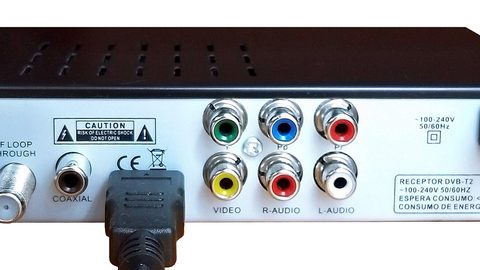
Component video uses three RCA connectors coloured green, blue, and red, carrying YPbPr signals. The Y channel carries luminance and sync. The Pb and Pr channels carry blue-difference and red-difference signals. Colour bandwidth is roughly 6.75 MHz for luma and 3.375 MHz per colour-difference channel per the ITU-R BT.601 standard. There is no colour subcarrier at all. Dot crawl and cross-colour are impossible. Maximum resolution on consumer gear is 1080p per CEA-861, though most older systems top out at 480p.
Component video is the North American consumer standard for high-quality analogue video. RGB SCART is the European equivalent, using a 21-pin connector with separate red, green, blue, and sync signals. Both are electrically superior to S-Video because they carry full colour bandwidth. The practical difference is which scaler input you have. The RetroTINK 5X-Pro and RetroTINK 4K accept both component and RGB SCART natively. The OSSC accepts component but not composite or S-Video, so it is the wrong choice if you need to clean up a composite source.
Consoles With Native Component Output
Component video is available on the PlayStation 2 (all models), the original Xbox (all models), the Xbox 360 (fat models only, removed on the 2010 S revision), the PlayStation 3 (all models, up to 1080p), and the Nintendo Wii (all models). The GameCube is the exception: only the DOL-001 model with the Digital AV Out port supports component output, and the OEM cable DOL-009 contains a custom DAC chip that is now prohibitively expensive. HD Retrovision makes a component cable for the SNES and Genesis that uses an internal transcoder to convert RGB to YPbPr, bypassing the need for a rare GameCube cable.
The Wii is the easiest system to connect via component. Every Wii outputs 480p over component, and the OEM cable RVL-011 is widely available. The Wii U also outputs 480p over component for Wii games, making it a viable option for playing the Wii library on a modern scaler. The PlayStation 2 supports 480p and even 1080i in titles like Gran Turismo 4, though most games run at 480i and require motion-adaptive deinterlacing in the scaler to avoid flicker.
The Analogue Video Signal Quality Hierarchy: Where Each Console Sits
The hierarchy from worst to best is: RF modulator, composite, S-Video, component, and RGB. Each step separates more of the signal and eliminates a specific artifact. RF combines video and audio onto a single carrier wave and is unusable on a modern display without a demodulator. Composite separates video from audio but combines all video information. S-Video separates luma from chroma. Component separates luma from colour-difference signals. RGB separates red, green, and blue entirely, with sync on a separate pin.
For a Hong Kong gamer with limited space and a single 4K display, the practical path is: use composite only if you have no other option, upgrade to S-Video for any system that supports it, and use component for the PlayStation 2, Wii, Xbox, and Xbox 360. The RetroTINK 5X-Pro handles all three inputs with sub-millisecond latency and outputs a clean 1440p signal with CRT simulation filters. The RetroTINK 4K adds HDR CRT emulation and 4K scanline masks for the ultimate image, but costs significantly more.
The failure case is the player who buys a generic HDMI converter from a Sham Shui Po electronics stall for 50 HKD. That converter treats 240p as 480i, adds 30 to 40 milliseconds of input lag, and produces a blurred, combed image. Spend that same 50 HKD on a high-quality S-Video cable and borrow a friend's RetroTINK. You will see what your hardware is actually capable of.
Retro Console Best Video Output: A Console-By-Console Guide
For each system, the best available analogue output defines what cable and scaler combination you need.
Super Nintendo and Super Famicom
The NTSC models SHVC-001 and SNS-001 output S-Video natively through the multi-AV port. The PAL models output RGB SCART natively. Component is available via the HD Retrovision cable, which transcodes the RGB output to YPbPr. The SNES Junior (SNS-101) removed the S-Video and RGB output circuits and requires a modification to restore them.
Nintendo 64
The NUS-001 outputs S-Video natively in NTSC regions. PAL units may have the S-Video circuit removed in later production runs. Component is not available without an RGB mod. The N64's video output is notoriously blurry due to the built-in low-pass filter, which softens the image regardless of cable quality. An RGB mod bypasses the filter and produces a sharp image best viewed on a CRT or through a scaler with a good scanline filter.
Nintendo GameCube
The DOL-001 model has a Digital AV Out port that outputs component video via the OEM cable DOL-009. The DOL-101 model removed this port and is limited to S-Video or composite. The OEM component cable contains a custom DAC chip and sells for over 200 USD on the second-hand market. A cheaper alternative is the Carby or GCHD HDMI adapter, which taps the digital signal directly and outputs a clean 480p over HDMI, bypassing the analogue domain entirely.
Sega Dreamcast
NTSC Dreamcasts output S-Video natively via the HKT-9600 cable. The VGA output via the HKT-8100 VGA box gives 480p, which is component-equivalent quality. PAL Dreamcasts do not output S-Video and are limited to composite or RGB SCART via a modified cable. The Dreamcast is one of the few systems where VGA is the best analogue option, and the OSSC handles VGA input natively.
Sony PlayStation 2
All models output component video via the multi-AV port. The OEM cable SCPH-10100 is widely available and inexpensive. The PS2 outputs 480i for most games, 480p for a subset, and 1080i for a handful of titles like Gran Turismo 4. Motion-adaptive deinterlacing in the scaler is critical for 480i games. The RetroTINK 5X-Pro handles this better than the OSSC, which uses bob deinterlacing that flickers.
Microsoft Xbox
All original Xbox models output component video via the High Definition AV Pack. Maximum resolution is 1080i in titles like Halo 2, with 480p and 720p widely supported. The Xbox 360 fat models also output component video up to 1080p. The Xbox 360 S and E models removed the analogue output and require HDMI.
The Cable Quality Trap: Why A Cheap Component Cable Can Look Worse Than A Good S-Video Cable
A cable is only as good as its termination and shielding. A component cable with poor 75-ohm impedance matching causes signal reflections that manifest as ghosting, ringing, and colour bleed. A component cable with thin conductors attenuates the colour-difference signals, producing a desaturated image with crushed blacks. A component cable with no shielding picks up electromagnetic interference from nearby power cables, creating a ground loop hum. That hum is a 50 Hz or 60 Hz buzz through the speakers.
The same failure modes apply to S-Video. A cable with incorrect impedance on the chroma conductor introduces luma-chroma crosstalk that looks exactly like dot crawl, defeating the purpose of upgrading from composite. A cable with poor chroma bandwidth rolls off the colour signal. Reds look pink. Blues look grey.
Buy cables from HD Retrovision or Insurrection Industries. These manufacturers use proper 75-ohm coaxial cable, gold-plated connectors, and full shielding. A cable from a Hong Kong electronics market is not a bargain if it introduces artifacts that a properly built cable eliminates. The rule is: spend more on the cable than you think you should. The cable is the only thing between your system's pure analogue output and the scaler's ADC.
The Scalers That Make The Hierarchy Work
Three scalers define the current market. The RetroTINK 5X-Pro accepts composite, S-Video, component, and RGB SCART, and outputs up to 1440p with sub-millisecond latency. It handles 240p correctly, applies motion-adaptive deinterlacing for 480i sources, and includes CRT simulation filters that replicate the look of a Sony PVM-20L5. The RetroTINK 4K adds HDR CRT emulation and 4K output with black frame insertion at 120 Hz. The OSSC is a line multiplier with no framebuffer and no composite or S-Video input, making it suitable only for RGB or component sources that are already clean.
Post-Processing and Budget Options
The mClassic is not a scaler in the same sense. It is a post-processing dongle that applies context-adaptive anti-aliasing and a mild upscale to a 1080p input. Its maximum output is 1440p, but independent testing with a Time Sleuth shows 1 to 2 milliseconds of added latency. It is useful for smoothing jagged edges on 3D games but does nothing to fix dot crawl, cross-colour, or 240p-as-480i misdetection. Use it after a RetroTINK, not instead of one.
For a Hong Kong gamer on a budget, the GBS-Control is a community-developed firmware that turns a GBS-8200 VGA scaler into a competent lag-free upscaler with motion-adaptive deinterlacing. It requires soldering and configuration, but it is the cheapest way to get a clean 480p output from a composite or S-Video source. The trade-off is chroma artifacts on fast-moving red objects due to the limited memory bandwidth of the GBS-8200 board.
Who Should Follow This Hierarchy And Who Should Skip It
The hierarchy suits the Hong Kong apartment gamer with one 4K OLED who needs to connect a Super Famicom, a PlayStation 2, and a Wii without buying three separate CRTs. It suits the competitive player who feels the difference between 16 milliseconds of lag and 32 milliseconds, and needs to know that a RetroTINK in framelock mode adds less than 1 millisecond while a cheap converter adds 2 to 4 frames. It suits the CRT-curious enthusiast who has access to second-hand Sony PVMs from local markets and needs to understand which cables to buy for a 50 Hz PAL unit running on a 60 Hz scaler.
Skip the hierarchy if you want a pre-modded system as a plug-and-play gift with no interest in settings menus. Visit a local Hong Kong retro shop and pay for a configured solution. Skip it if you are a PC gamer trying to upscale old 3D titles from a Windows desktop. You need dgVoodoo2 or DXVK, not analogue video cables. Skip it if you are a modern gamer wanting better anti-aliasing on a PlayStation 5. You need display-side motion blur and VRR guides, not scanline generators.
The single thing that most often goes wrong is the assumption that any cable will do. A high-quality component cable into a RetroTINK 5X-Pro transforms a Wii from a blurry, washed-out mess into a sharp 480p image that looks native on a 4K display. A cheap component cable from a bulk bin into the same scaler produces a desaturated, ghosted image that looks worse than S-Video. Buy the right cable once, and the hierarchy works exactly as documented. Buy the wrong cable, and you will blame the hardware, the scaler, and the standard itself.
More in this guide
HDMI Cables and Signal Chain Standards for Retro Gaming SetupsHow HDCP Causes No Signal Errors and Blocks Retro Scalers and Capture CardsAre Expensive HDMI Cables Worth It for a Retro Scaler Setup: Certified Ultra High Speed vs Generic.
Common Questions
What is the difference between composite, S-Video, and component video?
Composite combines luminance, chrominance, and sync onto one wire, causing dot crawl and cross-colour artifacts. S-Video separates luminance and chrominance onto two wires, eliminating dot crawl. Component separates the signal into luminance and two colour-difference channels on three wires, providing full colour bandwidth and no crosstalk.
Does S-Video eliminate dot crawl completely?
Yes. S-Video carries chroma on a separate conductor, so the chroma signal cannot leak into the luma channel. Dot crawl is a composite-only artifact caused by the colour subcarrier interfering with luminance information.
Can I use a component cable with a Nintendo 64?
No. The Nintendo 64 does not output component video natively. You need an RGB modification to the console, then a transcoder like the HD Retrovision cable to convert RGB to component. The N64's native output is composite or S-Video.
Is component video better than RGB SCART?
They are electrically equivalent in quality. Both carry full bandwidth colour signals with no subcarrier artifacts. The difference is the connector: component uses three RCA jacks and is the North American standard, while RGB SCART uses a 21-pin connector and is the European standard. Choose based on what your scaler accepts.
Why does my PlayStation 2 look worse over component than S-Video?
A bad component cable is the likely cause. A component cable with incorrect impedance or poor shielding introduces ghosting and colour bleed that can look worse than a good S-Video cable. Buy cables from HD Retrovision or Insurrection Industries to ensure proper termination.
What is the maximum resolution of component video?
On consumer gear, component video supports up to 1080p per the CEA-861 standard. Most retro consoles output 480p or lower, but the PlayStation 3 outputs 1080p over component, and the Xbox 360 fat models also output 1080p.
Do I need a scaler to use S-Video on a modern TV?
Most modern TVs have removed S-Video inputs. You need a scaler like the RetroTINK 5X-Pro or RetroTINK 4K that accepts S-Video and outputs HDMI. The scaler also handles the 240p-to-480i detection problem that cheap converters get wrong.